

SQLAlchemy Introduction
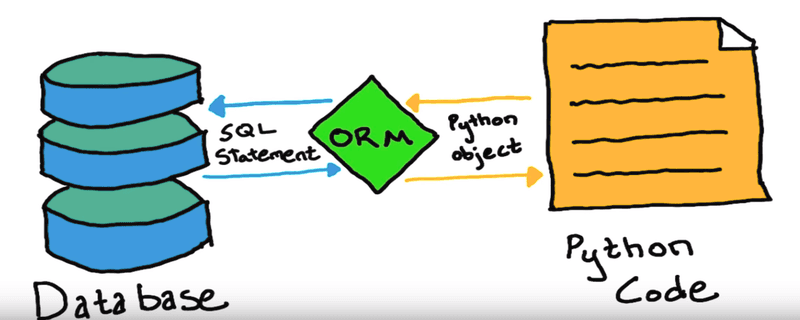
SQLAlchemy is a powerful Python library used to interact with relational databases through Python code. It provides tools for executing SQL queries, managing database connections, defining tables, and working with database records as Python objects.
SQLAlchemy supports two main approaches:
- SQLAlchemy Core: Provides a Python-based SQL expression language for creating and executing database queries.
- SQLAlchemy ORM: Maps database tables to Python classes and table records to Python objects.
Key Features of SQLAlchemy
- Supports popular relational databases such as MySQL, PostgreSQL, SQLite, Microsoft SQL Server, and Oracle.
- Allows developers to perform database operations using Python instead of writing raw SQL for every operation.
- Provides an Object Relational Mapping system for mapping database tables to Python classes.
- Supports transactions, relationships, joins, indexes, constraints, and connection pooling.
- Can be used with both ORM-based and SQL-expression-based approaches.
Installing SQLAlchemy
Make sure Python and pip are installed on your computer. Open a terminal or command prompt and run:
pip install sqlalchemyInstalling Database Drivers
SQLAlchemy requires an appropriate database driver when connecting to databases such as MySQL or PostgreSQL.
For MySQL using PyMySQL:
pip install sqlalchemy pymysqlFor PostgreSQL using Psycopg:
pip install sqlalchemy "psycopg[binary]"SQLite support is included with Python, so you do not need to install a separate SQLite driver.
Verify the Installation
Run the following Python code to verify that SQLAlchemy was installed successfully:
import sqlalchemy

print(sqlalchemy.__version__)
Example output:
2.0.45The displayed version may be different depending on the version currently installed on your computer.
Connecting to a Database
Before performing database operations, SQLAlchemy must establish a connection with the database. This is done using the create_engine() function.
from sqlalchemy import create_engine

engine = create_engine(
    "dialect+driver://username:password@host:port/database_name"
)
The connection URL contains the following parts:
- dialect: The type of database, such as MySQL or PostgreSQL.
- driver: The Python package used to communicate with the database.
- username: The database username.
- password: The database password.
- host: The address of the database server.
- port: The port on which the database server is running.
- database_name: The name of the database.
Common Database Connection Examples
1. Connecting to SQLite
SQLite stores data in a local file and does not require a separate database server. It is commonly used for learning, testing, prototypes, and small applications.
from sqlalchemy import create_engine

engine = create_engine("sqlite:///students.db")
This creates a connection to an SQLite database file named students.db. If the file does not exist, SQLite creates it automatically when the database is first used.
2. Connecting to MySQL
MySQL is a relational database management system commonly used in web and enterprise applications.
First, install PyMySQL:
pip install pymysqlThen create the database engine:
from sqlalchemy import create_engine

engine = create_engine(
    "mysql+pymysql://root:password@localhost:3306/company"
)
In this connection URL:
mysqlis the database dialect.pymysqlis the Python database driver.rootis the database username.passwordis the database password.localhostis the database host.3306is the default MySQL port.companyis the database name.
3. Connecting to PostgreSQL
PostgreSQL is an open-source relational database known for its reliability, performance, and advanced database features.
First, install Psycopg:
pip install "psycopg[binary]"Then create the database engine:
from sqlalchemy import create_engine

engine = create_engine(
    "postgresql+psycopg://username:password@localhost:5432/company"
)
In this connection URL:
postgresqlis the database dialect.psycopgis the Python database driver.usernameis the database username.passwordis the database password.localhostis the database host.5432is the default PostgreSQL port.companyis the database name.
Testing the Database Connection
After creating the engine, use the following code to test whether SQLAlchemy can connect to the database:
from sqlalchemy import create_engine, text

engine = create_engine("sqlite:///students.db")

with engine.connect() as connection:
    result = connection.execute(text("SELECT 1"))
    print(result.scalar())
Output:
1If the output is 1, the database connection was established successfully.
Creating a Table with SQLAlchemy Core
The following example creates a books table using SQLAlchemy Core:
from sqlalchemy import (
    create_engine,
    MetaData,
    Table,
    Column,
    Integer,
    String,
)

engine = create_engine("sqlite:///library.db")

metadata = MetaData()

books = Table(
    "books",
    metadata,
    Column("id", Integer, primary_key=True),
    Column("title", String(200), nullable=False),
    Column("category", String(100), nullable=False),
    Column("publish_year", Integer, nullable=False),
)

metadata.create_all(engine)
This table contains the following columns:
id– Primary key for each book.title– Name of the book.category– Category of the book.publish_year– Year in which the book was published.
The metadata.create_all(engine) statement creates the table if it does not already exist.
Inserting Data
Use the insert() function to add records to a database table:
from sqlalchemy import insert

statement = insert(books).values(
    title="Learning Python",
    category="Programming",
    publish_year=2023,
)

with engine.begin() as connection:
    connection.execute(statement)
The engine.begin() context manager automatically commits the transaction when the operation completes successfully. If an error occurs, the transaction is rolled back.
Inserting Multiple Records
from sqlalchemy import insert

book_records = [
    {
        "title": "Python Fundamentals",
        "category": "Programming",
        "publish_year": 2021,
    },
    {
        "title": "Database Design",
        "category": "Database",
        "publish_year": 2020,
    },
    {
        "title": "FastAPI Development",
        "category": "Programming",
        "publish_year": 2024,
    },
]

with engine.begin() as connection:
    connection.execute(insert(books), book_records)
Querying Data with SQLAlchemy
SQLAlchemy allows you to build database queries using Python expressions instead of writing raw SQL statements. These queries are database-independent and easier to integrate with Python applications.
Example 1: Selecting All Records
SQL query:
SELECT *
FROM books;
SQLAlchemy query:
from sqlalchemy import select

statement = select(books)

with engine.connect() as connection:
    result = connection.execute(statement)

    for row in result:
        print(row)
Example 2: Filtering Records
The following query retrieves books whose category is Programming.
SQL query:
SELECT *
FROM books
WHERE category = 'Programming';
SQLAlchemy query:
from sqlalchemy import select

statement = select(books).where(
    books.c.category == "Programming"
)

with engine.connect() as connection:
    result = connection.execute(statement)

    for row in result:
        print(row)
Explanation:
select(books)creates a query that selects records from thebookstable.books.c.categoryaccesses thecategorycolumn.where()returns only records whose category isProgramming.
Example 3: Using Multiple Conditions
The following query retrieves books in the Programming category that were published after 2020.
SQL query:
SELECT *
FROM books
WHERE category = 'Programming'
AND publish_year > 2020;
SQLAlchemy query:
from sqlalchemy import and_, select

statement = select(books).where(
    and_(
        books.c.category == "Programming",
        books.c.publish_year > 2020,
    )
)

with engine.connect() as connection:
    result = connection.execute(statement)

    for row in result:
        print(row)
Explanation:
and_()combines multiple filtering conditions.- The first condition selects books from the
Programmingcategory. - The second condition selects books published after 2020.
- A record is returned only when both conditions are satisfied.
Multiple conditions can also be passed directly to
where(). SQLAlchemy combines them using the SQLANDoperator.
statement = select(books).where(
    books.c.category == "Programming",
    books.c.publish_year > 2020,
)
Updating Data
Use the update() function to modify existing records:
from sqlalchemy import update

statement = (
    update(books)
    .where(books.c.id == 1)
    .values(publish_year=2024)
)

with engine.begin() as connection:
    result = connection.execute(statement)
    print(f"Updated rows: {result.rowcount}")
Deleting Data
Use the delete() function to remove records:
from sqlalchemy import delete

statement = delete(books).where(books.c.id == 1)

with engine.begin() as connection:
    result = connection.execute(statement)
    print(f"Deleted rows: {result.rowcount}")
Always include a suitable
WHEREcondition when updating or deleting records. Without one, every record in the table may be affected.
SQL vs SQLAlchemy
| SQL | SQLAlchemy |
|---|---|
| Queries are written as SQL statements. | Queries are built using Python expressions. |
| Requires knowledge of SQL syntax. | Uses Python objects, functions, and methods. |
| Tables and columns are referenced directly by name. | Tables and columns are represented as Python objects. |
| Some syntax may differ between database systems. | Provides a mostly consistent API across supported databases. |
| Best suited for direct and highly customized database operations. | Suitable for SQL-expression-based and ORM-based development. |
| Relationships must usually be handled manually. | The ORM can manage relationships between Python models. |
| Developers manually build SQL query strings. | SQLAlchemy safely binds values as query parameters. |
SQLAlchemy Core vs SQLAlchemy ORM
| SQLAlchemy Core | SQLAlchemy ORM |
|---|---|
| Works primarily with table objects. | Works primarily with Python classes and objects. |
| Closer to traditional SQL. | Provides a higher-level object-oriented approach. |
Queries use functions such as select(). | Queries commonly use mapped classes and sessions. |
| Useful when detailed control over SQL is required. | Useful for applications with models and relationships. |
Complete SQLAlchemy Core Example
from sqlalchemy import (
    Column,
    Integer,
    MetaData,
    String,
    Table,
    create_engine,
    insert,
    select,
)


engine = create_engine("sqlite:///library.db")

metadata = MetaData()

books = Table(
    "books",
    metadata,
    Column("id", Integer, primary_key=True),
    Column("title", String(200), nullable=False),
    Column("category", String(100), nullable=False),
    Column("publish_year", Integer, nullable=False),
)

metadata.create_all(engine)


with engine.begin() as connection:
    connection.execute(
        insert(books),
        [
            {
                "title": "Python Fundamentals",
                "category": "Programming",
                "publish_year": 2021,
            },
            {
                "title": "Database Design",
                "category": "Database",
                "publish_year": 2020,
            },
            {
                "title": "FastAPI Development",
                "category": "Programming",
                "publish_year": 2024,
            },
        ],
    )


statement = select(books).where(
    books.c.category == "Programming",
    books.c.publish_year > 2020,
)

with engine.connect() as connection:
    result = connection.execute(statement)

    for book in result.mappings():
        print(
            book["id"],
            book["title"],
            book["category"],
            book["publish_year"],
        )
Example output:
1 Python Fundamentals Programming 2021
3 FastAPI Development Programming 2024
Best Practices
- Store database usernames and passwords in environment variables instead of placing them directly in the source code.
- Use
engine.begin()for operations that modify data and require transaction handling. - Use SQLAlchemy’s query-building functions instead of constructing SQL strings manually.
- Always add appropriate conditions to update and delete operations.
- Use connection pooling for production applications.
- Use the SQLAlchemy ORM when your application needs Python models, relationships, and reusable business logic.
Note:
SQLAlchemy provides a powerful and flexible way to interact with relational databases using Python. It supports both SQL-style database operations through SQLAlchemy Core and object-oriented database development through SQLAlchemy ORM.
Developers can use SQLAlchemy with SQLite, MySQL, PostgreSQL, and several other relational databases while maintaining a consistent Python-based interface.
Comments