

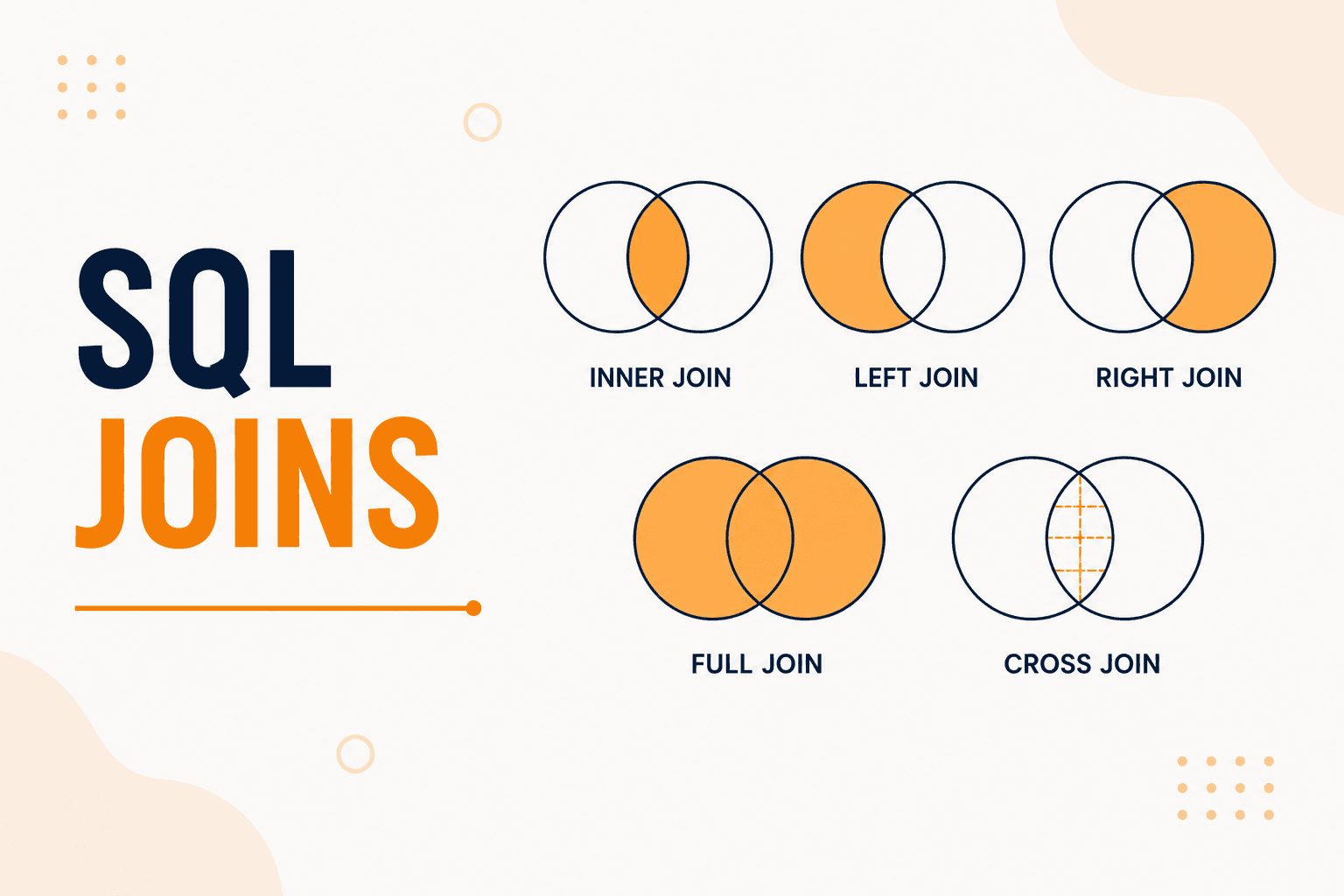
SQL Joins
SQL Joins Explained
When we started learning SQL, we understood how to create tables and retrieve data using SELECT. But then we came across a question:
What happens when the information we need is stored in two different tables?
This is where SQL Joins become useful.
A JOIN allows us to combine related data from two or more tables using a common column.
What is a SQL JOIN?
A SQL JOIN is used to combine rows from two or more tables based on a related column.
For example, imagine we have two tables.
Students Table
| student_id | student_name | course_id |
|---|---|---|
| 1 | Ravi | 101 |
| 2 | Priya | 102 |
| 3 | Arun | 101 |
| 4 | Sneha | 103 |
Courses Table
| course_id | course_name |
|---|---|
| 101 | Java |
| 102 | Python |
| 103 | SQL |
Both tables have a common column called course_id.
We can use this column to connect the two tables.
Why Do We Need JOINs?
In a real application, we normally don't store everything in one huge table.
For example, an e-commerce application might have separate tables for:
- Customers
- Products
- Orders
- Payments
- Addresses
Instead of repeating the same information everywhere, we can keep the data in separate tables and connect them when needed.
That's one of the main reasons JOINs are important.
1. INNER JOIN
An INNER JOIN returns only the records that have matching values in both tables.
For example:
SELECT students.student_name, courses.course_name
FROM students
INNER JOIN courses
ON students.course_id = courses.course_id;
The result would look like:
| student_name | course_name |
|---|---|
| Ravi | Java |
| Priya | Python |
| Arun | Java |
| Sneha | SQL |
Only matching course_id values are returned.
Simple way to remember
INNER JOIN = Give me the matching records from both tables.
2. LEFT JOIN
A LEFT JOIN returns all records from the left table and the matching records from the right table.
Let's add another student:
| student_id | student_name | course_id |
|---|---|---|
| 5 | Kiran | 104 |
There is no course with course_id = 104.
Now let's use a LEFT JOIN:
SELECT students.student_name, courses.course_name
FROM students
LEFT JOIN courses
ON students.course_id = courses.course_id;
The result includes Kiran even though there is no matching course.
| student_name | course_name |
|---|---|
| Ravi | Java |
| Priya | Python |
| Arun | Java |
| Sneha | SQL |
| Kiran | NULL |
Simple way to remember
LEFT JOIN = Give me everything from the left table, and whatever matches from the right table.
3. RIGHT JOIN
A RIGHT JOIN is basically the opposite of a LEFT JOIN.
It returns all records from the right table and matching records from the left table.
For example:
SELECT students.student_name, courses.course_name
FROM students
RIGHT JOIN courses
ON students.course_id = courses.course_id;
If a course doesn't have any students, that course will still appear in the result.
Simple way to remember
RIGHT JOIN = Give me everything from the right table, and whatever matches from the left table.
4. FULL OUTER JOIN
A FULL OUTER JOIN returns all records from both tables.
If a record has a match, the related information is displayed.
If there is no match, NULL is displayed for the missing side.
Conceptually:
SELECT students.student_name, courses.course_name
FROM students
FULL OUTER JOIN courses
ON students.course_id = courses.course_id;
This means we get:
- Matching students and courses
- Students without a matching course
- Courses without a matching student
Important Note
Some databases support FULL OUTER JOIN directly, while others require a different approach.
For example, MySQL does not directly support FULL OUTER JOIN.
5. CROSS JOIN
A CROSS JOIN combines every row from the first table with every row from the second table.
For example, if one table has 4 rows and another table has 3 rows:
4 × 3 = 12 combinations
Example:
SELECT students.student_name, courses.course_name
FROM students
CROSS JOIN courses;
This produces every possible student-course combination.
Simple way to remember
CROSS JOIN = Every possible combination.
Because the number of rows can grow very quickly, we should use CROSS JOIN carefully.
6. SELF JOIN
A SELF JOIN is when a table is joined with itself.
This can be useful when records in the same table have relationships with each other.
For example, imagine an employees table:
| employee_id | employee_name | manager_id |
|---|---|---|
| 1 | Ravi | NULL |
| 2 | Priya | 1 |
| 3 | Arun | 1 |
Here, manager_id refers to another employee in the same table.
We can use a SELF JOIN:
SELECT
    employee.employee_name AS employee,
    manager.employee_name AS manager
FROM employees employee
LEFT JOIN employees manager
ON employee.manager_id = manager.employee_id;
The result can look like:
| employee | manager |
|---|---|
| Ravi | NULL |
| Priya | Ravi |
| Arun | Ravi |
This is useful for hierarchical data such as employees and managers.
Quick Comparison of SQL JOINs
| JOIN | What it returns |
|---|---|
| INNER JOIN | Matching records from both tables |
| LEFT JOIN | All left records + matching right records |
| RIGHT JOIN | All right records + matching left records |
| FULL OUTER JOIN | All records from both tables |
| CROSS JOIN | Every possible combination |
| SELF JOIN | A table joined with itself |
A Real-World Example
Let's imagine an online shopping application.
We might have:
Customers
| customer_id | name |
|---|---|
| 1 | Ravi |
| 2 | Priya |
Orders
| order_id | customer_id | product |
|---|---|---|
| 101 | 1 | Laptop |
| 102 | 2 | Keyboard |
If we want to find out which customer placed which order, we can join the tables.
SELECT
    customers.name,
    orders.product
FROM customers
INNER JOIN orders
ON customers.customer_id = orders.customer_id;
Result:
| name | product |
|---|---|
| Ravi | Laptop |
| Priya | Keyboard |
This is a simple example of how JOINs are used in real applications.
JOINs and NULL Values
One thing that is important to understand with JOINs is NULL.
When we use a LEFT JOIN and there is no matching record in the right table, SQL returns NULL.
For example:
| student_name | course_name |
|---|---|
| Ravi | Java |
| Kiran | NULL |
Here, NULL doesn't mean that Kiran's course is literally the word "NULL".
It means that no matching course was found.
Common Mistakes When Using JOINs
When I started learning JOINs, there were a few things that seemed easy to get wrong.
1. Joining the wrong columns
We need to make sure the columns used in the ON condition actually represent a relationship.
For example:
ON students.course_id = courses.course_id
2. Forgetting the JOIN condition
An incorrect or missing JOIN condition can produce unexpected results.
3. Using the wrong type of JOIN
Before writing a query, think about what records you actually need.
Do you need:
- Only matching records?
- Everything from the left table?
- Everything from the right table?
- All records from both tables?
Choosing the right JOIN makes the query much easier to understand.
What We Learned
Before learning JOINs, I thought we could simply store all the information in one table.
But as applications become bigger, keeping everything in one table is not practical.
JOINs allow us to keep related information in separate tables and combine it whenever we need it.
The main JOINs I learned are:
INNER JOIN, LEFT JOIN, RIGHT JOIN, FULL OUTER JOIN, CROSS JOIN, and SELF JOIN.
Understanding the difference between them is important because each JOIN is useful for a different situation.
Comments