

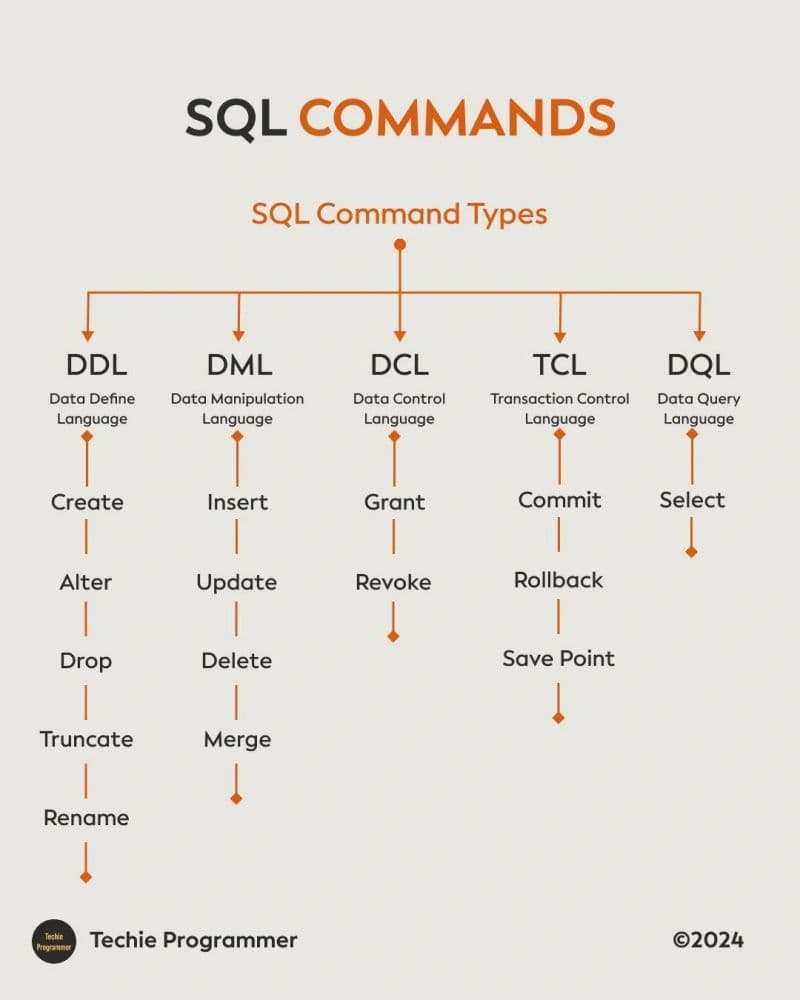
SQL commands
You know how your social media apps store and retrieve the posts, reels and etc and the answer is simple it uses the data base. where we can do CRUD operations inside a database. so to do such operations we use a language to communicate that language is known as SQL. SQL stands for stuctured quiery language. In SQL we have some commands to do operations.
SQL commands
SELECT — Retrieving Data
SELECT is the most common SQL command. It's used to read data from a table
SELECT name, salary FROM Employees;
This retrieves the name and salary columns for every employee.
2. WHERE — Filtering Results
WHERE narrows down your results based on a condition.
SELECT * FROM Employees WHERE department = 'Sales';
This returns only employees who work in Sales.
You can combine conditions with AND and OR:
SELECT * FROM Employees WHERE department = 'Sales' AND salary > 50000;
This returns Sales employees earning more than 50,000.
3.INSERT — Adding New Data
INSERT adds a new row to a table.
INSERT INTO Employees (id, name, department, salary)
VALUES (5, 'raju', 'Marketing', 60000);This adds a new employee, Emma, to the table.
4. UPDATE — Modifying Existing Data
changes values that already exist
UPDATE Employees SET salary = 75000 WHERE name = 'raju';
This gives Carla a raise, updating her salary to 75,000.
Important: Always use WHERE with UPDATE, or you'll update every row in the table by accident.
5. DELETE — Removing Data
DELETE removes rows from a table
DELETE FROM Employees WHERE name = 'Babu';
This removes Bob's record entirely.
Important: Like UPDATE, always use WHERE with DELETE, or you'll delete every row.
6. ORDER BY — Sorting Results
ORDER BY sorts your query results.
SELECT name, salary FROM Employees ORDER BY salary DESC;
This lists employees from highest paid to lowest (DESC= descending).
7. COUNT, SUM, AVG — Aggregate Functions
These functions let you calculate things across multiple rows.
SELECT COUNT(*) FROM Employees;
Counts how many employees there are.
SELECT AVG(salary) FROM Employees;
Calculates the average salary.
SELECT SUM(salary) FROM Employees WHERE department = 'Sales';
Adds up the total salary paid to the Sales department.
8. GROUP BY — Grouping Results
GROUP BY groups rows that share a value, usually paired with an aggregate function.
SELECT department, AVG(salary) FROM Employees GROUP BY department;
This gives you the average salary per department, instead of one single average.
Comments