

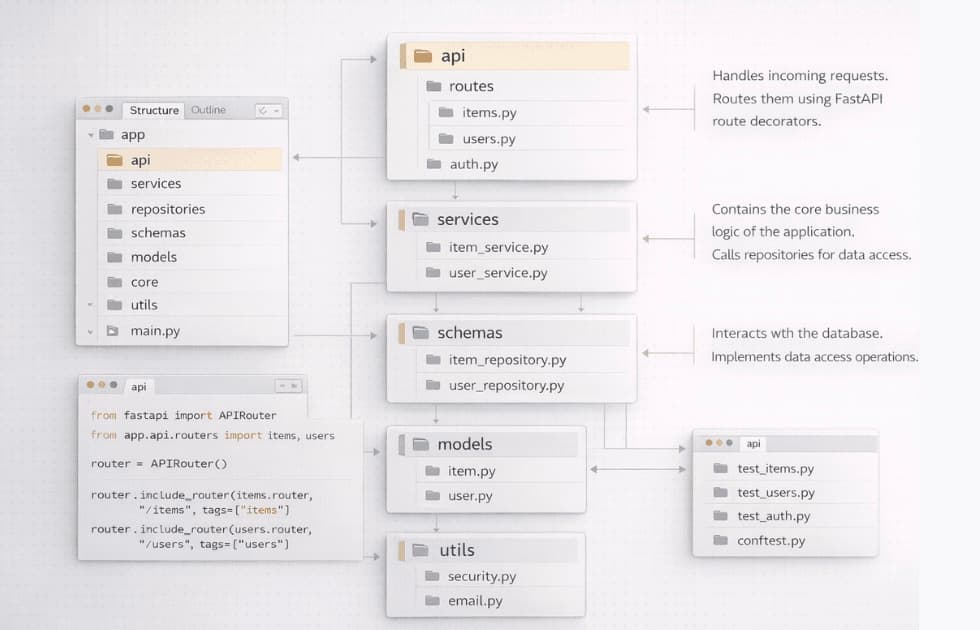
Fastapi Big and scalable project structure
How to Structure a FastAPI Application with Multiple Files
To scale a FastAPI application beyond a single main.py file, you should break your application into multiple modules using APIRouter.
This allows you to group related endpoints into dedicated files and packages, making your application easier to maintain, test, and scale.
There are two common industry-standard approaches for organizing a multiple-file FastAPI application.
Option 1: Structure by Architecture
Best for small to medium applications.
This approach organizes files according to their technical responsibility. For example, all API routes are placed together, all database models are placed together, and all Pydantic schemas are placed together.
This structure is straightforward and closely follows the approach used in FastAPI's Bigger Applications documentation.
my_fastapi_project/
├── app/
│   ├── __init__.py
│   ├── main.py
│   │
│   ├── core/
│   │   ├── __init__.py
│   │   └── config.py
│   │
│   ├── database.py
│   │
│   ├── models/
│   │   ├── __init__.py
│   │   ├── items.py
│   │   └── users.py
│   │
│   ├── schemas/
│   │   ├── __init__.py
│   │   ├── items.py
│   │   └── users.py
│   │
│   └── routers/
│       ├── __init__.py
│       ├── items.py
│       └── users.py
│
├── .env
├── requirements.txt
└── README.md
What Each Folder Does
- main.py – Initializes the FastAPI application and registers routers.
- core/ – Contains application-wide configuration, settings, security, and utilities.
- database.py – Handles database engine and session configuration.
- models/ – Contains SQLAlchemy or other database models.
- schemas/ – Contains Pydantic models used for request and response validation.
- routers/ – Contains API endpoints grouped by functionality.
Option 2: Structure by Domain / Feature
Best for large and complex applications.
As an application grows, organizing everything by technical layer can become difficult to maintain.
A domain-based structure keeps everything related to one business feature inside the same directory. This is similar to the way Django applications organize functionality into individual apps.
my_fastapi_project/
├── app/
│   ├── __init__.py
│   ├── main.py
│   │
│   ├── core/
│   │   ├── __init__.py
│   │   ├── config.py
│   │   └── database.py
│   │
│   ├── users/
│   │   ├── __init__.py
│   │   ├── router.py
│   │   ├── models.py
│   │   ├── schemas.py
│   │   └── service.py
│   │
│   └── products/
│       ├── __init__.py
│       ├── router.py
│       ├── models.py
│       ├── schemas.py
│       └── service.py
│
├── .env
├── requirements.txt
└── README.md
For example, everything related to users is contained inside app/users/, while everything related to products is contained inside app/products/.
This makes it easier for large teams to work on individual features without constantly navigating between separate global folders.
Core Implementation Using APIRouter
Regardless of which project structure you choose, FastAPI connects the different modules using APIRouter.
1. Define Routes in a Separate Module
Instead of defining every endpoint using @app.get() inside main.py, create an APIRouter.
For example, create:
app/routers/users.pyThen add the following code:
from fastapi import APIRouter

router = APIRouter(
    prefix="/users",
    tags=["Users"]
)


@router.get("/")
async def get_users():
    return [
        {"username": "alice"},
        {"username": "bob"}
    ]


@router.get("/{user_id}")
async def get_user(user_id: int):
    return {
        "user_id": user_id,
        "username": "alice"
    }
Understanding APIRouter
The APIRouter works like a mini FastAPI application.
router = APIRouter(
    prefix="/users",
    tags=["Users"]
)
The prefix automatically adds /users before every endpoint defined inside this router.
For example:
@router.get("/")becomes:
GET /users/And:
@router.get("/{user_id}")becomes:
GET /users/{user_id}The tags option groups these endpoints together inside the automatically generated Swagger documentation.
2. Include Routers in main.py
Once your routers are created, import them into the application's central entry point.
Example:
from fastapi import FastAPI
from app.routers import users, items

app = FastAPI(
    title="My Scalable API"
)

app.include_router(users.router)
app.include_router(items.router)


@app.get("/")
async def root():
    return {
        "message": "Welcome to the central entrypoint!"
    }
The include_router() method registers each router with the main FastAPI application.
Your application can now have hundreds of endpoints distributed across multiple files while still running through a single FastAPI application.
Important Best Practices
Always Use __init__.py
Add an __init__.py file inside your application packages.
app/
├── __init__.py
├── routers/
│   ├── __init__.py
│   └── users.py
This makes the package structure explicit and helps keep imports predictable.
Avoid Circular Dependencies
Avoid placing shared resources such as database sessions, configuration, authentication utilities, or global dependencies directly inside route files.
Instead, keep shared functionality in dedicated modules such as:
app/core/config.py
app/core/security.py
app/core/database.py
app/dependencies.py
Keep Business Logic Outside Routers
Routers should primarily handle HTTP-related responsibilities such as receiving requests, validating parameters, calling application logic, and returning responses.
For larger applications, move business logic into service modules.
users/
├── router.py
├── schemas.py
├── models.py
└── service.py
This keeps your API endpoints small and makes your business logic easier to test and reuse.
Which Structure Should You Choose?
| Project Type | Recommended Structure |
|---|---|
| Small FastAPI application | Architecture-based |
| Medium application | Architecture-based or hybrid |
| Large application | Domain / feature-based |
| Large team / many independent features | Domain / feature-based |
Final Recommendation
For small and medium FastAPI projects, starting with an architecture-based structure is usually the simplest approach.
As the application becomes larger, a feature or domain-based structure becomes easier to maintain because each feature contains its routes, schemas, models, and business logic in one location.
Most importantly, use APIRouter to keep endpoints modular and avoid turning main.py into a large file containing the entire application.
Comments