

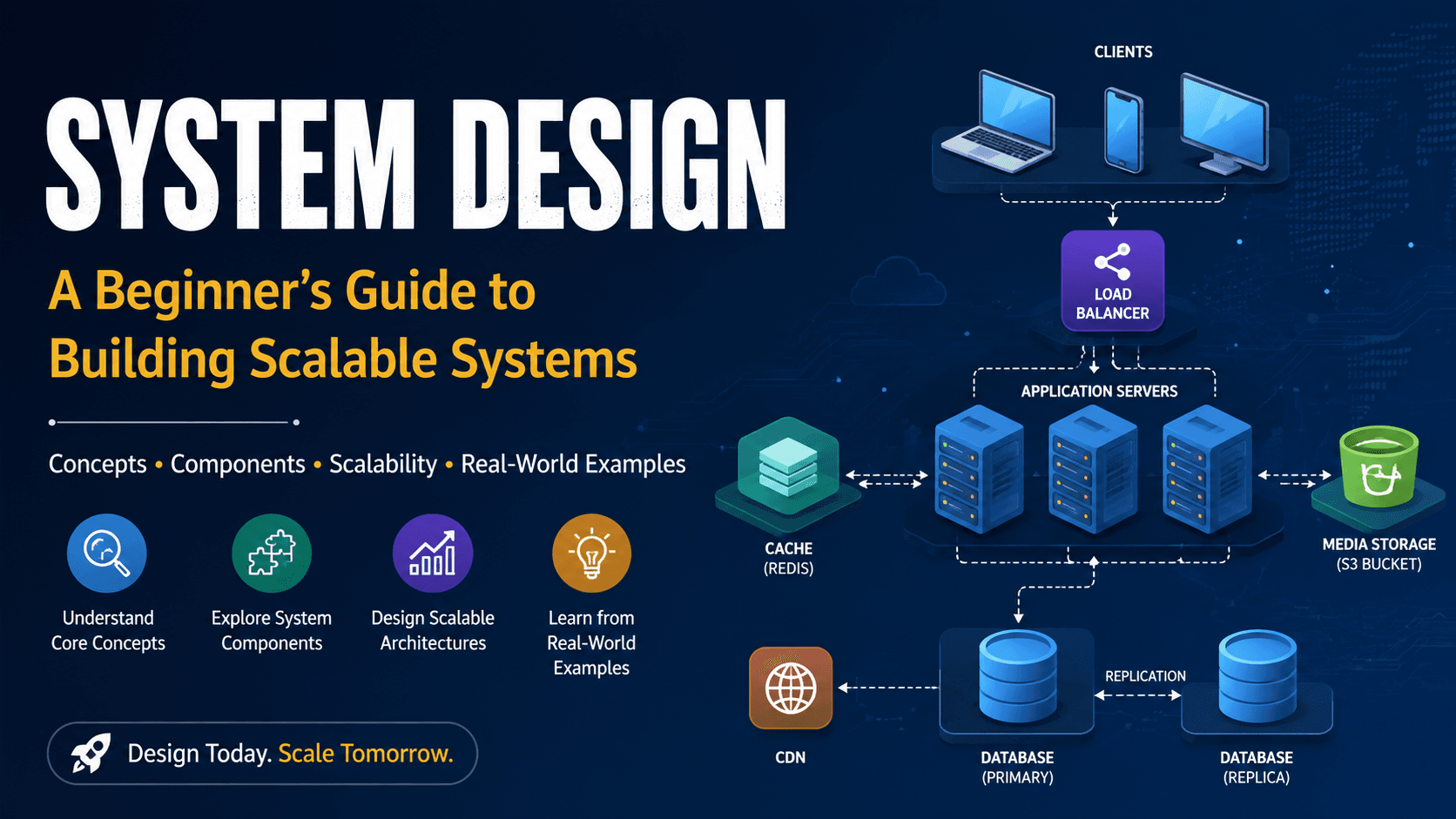
"A Beginner’s Guide to Building Scalable Systems"
System Design:
Introduction:
Have you ever wondered how applications like Amazon, Instagram, YouTube, or Netflix can serve millions of users at the same time without completely breaking down?
Behind every large-scale application, there is a well-planned system design.
System Design is the process of planning how different components of a software application should work together. It helps developers decide how users will communicate with the application, where data will be stored, how requests will be processed, and how the system can continue working when the number of users increases.
In simple words:
System Design is the blueprint of a software system.
Just like an architect creates a blueprint before constructing a building, software engineers design the architecture of an application before building the complete system.
Why Is System Design Important?
When we build a small application, we may only have a few users. A simple server and database may be enough.
But imagine an application with millions of users.
For example, an e-commerce application may have users searching for products, adding products to carts, placing orders, making payments, and tracking deliveries—all at the same time.
If the application is not properly designed, it can become:
- Slow
- Difficult to maintain
- Expensive to operate
- Unreliable
- Difficult to scale
- Vulnerable to failures
System Design helps us build applications that are scalable, reliable, secure, and efficient.
Basic Components of System Design
A typical software system contains several important components. Each component has a specific responsibility.
1. Client
The client is the part of the application through which users interact with the system.
Examples include:
- Web browsers
- Mobile applications
- Desktop applications
For example, when you open an e-commerce website and search for a mobile phone, your browser acts as the client.
The client sends a request to the backend server and displays the response received from the server.
2. Server
A server receives requests from clients, processes them, and sends responses back.
For example, when a user logs into an application, the request goes from the client to the server.
The server may:
- Receive the login request.
- Validate the user's information.
- Check the database.
- Verify the credentials.
- Send a response to the client.
The server is responsible for implementing the application's business logic.
3. Database
A database is used to store and manage application data.
For example, an e-commerce application may store:
- User information
- Product information
- Order details
- Payment information
- Customer addresses
Popular databases include MySQL, PostgreSQL, MongoDB, and Oracle.
The database allows applications to store data permanently and retrieve it whenever required.
4. API
API stands for Application Programming Interface.
An API acts as a communication bridge between different software components.
For example:
Frontend → API → Backend → Database
Suppose a user wants to see their profile.
The frontend sends a request to an API. The backend processes the request, retrieves the required information from the database, and sends the result back through the API.
APIs are commonly used to connect frontend applications with backend services.
5. Load Balancer
Imagine an application has one server and suddenly thousands of users send requests at the same time.
The single server may become overloaded.
A Load Balancer helps solve this problem by distributing incoming requests across multiple servers.
For example:
Users → Load Balancer → Server 1
** → Server 2**
** → Server 3**
Instead of sending every request to one server, the load balancer distributes the traffic.
This improves:
- Performance
- Availability
- Reliability
- Scalability
6. Cache
A cache is a temporary storage system used to store frequently accessed data.
For example, suppose thousands of users request the same product information.
Without caching, the application may need to query the database every time.
With caching:
User → Server → Cache
If the required data is already available in the cache, the server can return it much faster.
Popular caching technologies include Redis and Memcached.
Caching can reduce database load and improve application response time.
How Do These Components Work Together?
Let's understand the complete flow using an e-commerce application.
Suppose a user searches for a product.
Step 1: Client Sends Request
The user searches for a product from a web browser or mobile application.
The client sends the request to the backend.
Step 2: Load Balancer Receives Request
The load balancer receives the request and decides which server should handle it.
Step 3: Server Processes Request
The selected application server processes the request.
Step 4: Cache Is Checked
The server checks whether the requested product information is already available in the cache.
If it is available, the data can be returned quickly.
Step 5: Database Is Accessed
If the data is not available in the cache, the server requests it from the database.
Step 6: Response Is Sent
The server receives the data and sends the response back to the client.
The user can then see the product information on the screen.
The simplified flow looks like this:
Client → Load Balancer → Application Server → Cache → Database → Response
This is a basic example of how different system components communicate with each other.
Scalability in System Design
One of the most important concepts in System Design is scalability.
Scalability means the ability of a system to handle an increasing number of users or requests without significantly reducing performance.
For example, imagine an application that works perfectly with 1,000 users.
After becoming popular, it may receive 1 million users.
A scalable system should be able to handle this increase in traffic.
There are two common approaches:
Vertical Scaling
Vertical scaling means increasing the resources of an existing server.
For example:
- More RAM
- More CPU
- More storage
It is simple, but it has physical and cost limitations.
Horizontal Scaling
Horizontal scaling means adding more servers to handle increasing traffic.
For example:
1 Server → 3 Servers → 10 Servers → 100 Servers
A load balancer can distribute requests between these servers.
Horizontal scaling is commonly used in large-scale applications because it allows systems to grow more easily.
High-Level Design vs Low-Level Design
System Design is commonly discussed at two levels.
High-Level Design (HLD)
High-Level Design focuses on the overall architecture of the system.
It describes components such as:
- Clients
- Servers
- Databases
- APIs
- Load Balancers
- Caches
- External services
HLD answers the question:
“What are the major components and how do they communicate?”
Low-Level Design (LLD)
Low-Level Design focuses on the internal implementation of the system.
It may include:
- Classes
- Objects
- Methods
- Interfaces
- Database tables
- Relationships
- Design patterns
LLD answers the question:
“How should each component be implemented?”
Important System Design Concepts
While learning System Design, some concepts are especially important.
Scalability
The ability to handle increasing users and traffic.
Availability
The ability of a system to remain available when users need it.
Reliability
The ability of a system to consistently perform correctly.
Performance
How quickly the system can process requests and return responses.
Security
Protecting user data and preventing unauthorized access.
Fault Tolerance
The ability of a system to continue working even when some components fail.
Database Replication
Keeping copies of database data on multiple servers to improve availability and performance.
Caching
Storing frequently accessed data temporarily to provide faster responses.
Real-World Example: Designing an E-Commerce System
Let's imagine we are building an e-commerce application.
A user opens the application and searches for a product.
The request can follow this architecture:
User → Client → Load Balancer → Application Server → Cache/Database → Response
When the user places an order, the application server may communicate with several services such as:
- User Service
- Product Service
- Order Service
- Payment Service
- Notification Service
The order information is stored in the database, payment is processed through a payment service, and the user may receive a confirmation notification.
As the application grows, we can add more servers, introduce caching, use database replication, and distribute traffic across multiple services.
This shows why System Design becomes important as an application grows.
Common Mistakes in System Design
Beginners often focus only on making the application work.
However, a good system design should also consider what happens when the application grows or something fails.
Some common mistakes include:
- Depending on a single server
- Not considering database performance
- Ignoring security
- Not planning for increasing traffic
- Storing everything in one place
- Not handling server failures
- Ignoring caching where it is useful
A good system design considers both the normal situation and unexpected situations.
How to Learn System Design
You don't need to learn everything at once.
A beginner can follow this order:
- Understand Client and Server
- Learn HTTP and APIs
- Learn Databases
- Understand Load Balancers
- Learn Caching
- Understand Scalability
- Learn Database Replication
- Understand Message Queues
- Learn Microservices
- Practice designing real-world applications
Start with small systems and gradually move toward larger systems.
For example:
URL Shortener → Chat Application → E-Commerce → Instagram → YouTube
By designing different applications, you will slowly understand how real-world systems are built.
Comments